
Leaving a Google Group: Difference between revisions
Imported from Confluence |
No edit summary |
||
| Line 1: | Line 1: | ||
__TOC__ | __TOC__ | ||
== | == Where can I access the Google Groups Page? == | ||
If you wish to change your Google Group Membership settings such as leaving the group or changing how often mail is delivered to you, go to the Google Groups page by clicking on the App Menu (or the icon made up of 9 squares) in the top-right corner of any other Google app such as Gmail or Drive. | If you wish to change your Google Group Membership settings such as leaving the group or changing how often mail is delivered to you, go to the Google Groups page by clicking on the App Menu (or the icon made up of 9 squares) in the top-right corner of any other Google app such as Gmail or Drive. | ||
[[File:Screenshot 2024-08-21 at 4.04.21 PM.png|290px|alt=A screenshot of the upper righthand corner of a Google app, highlighting the 'bento box' menu found to the left of the Swarthmore logo.]] | [[File:Screenshot 2024-08-21 at 4.04.21 PM.png|290px|alt=A screenshot of the upper righthand corner of a Google app, highlighting the 'bento box' menu found to the left of the Swarthmore logo.]] | ||
Clicking here will open up your apps menu, where you will find the Google Groups icon. | Clicking here will open up your apps menu, where you will find the Google Groups icon. | ||
[[File:Screenshot 2024-08-21 at 3.59.35 PM.png|307px|alt=A screenshot of the Google 'bento box' menu, highlighting Google Groups.]] | [[File:Screenshot 2024-08-21 at 3.59.35 PM.png|307px|alt=A screenshot of the Google 'bento box' menu, highlighting Google Groups.]] | ||
Alternatively, you can go to this URL while logged into Google Workspace: https://groups.google.com/my-groups | Alternatively, you can go to this URL while logged into Google Workspace: https://groups.google.com/my-groups | ||
| Line 19: | Line 21: | ||
== '''How do I leave a Google Group?''' == | == '''How do I leave a Google Group?''' == | ||
# Once on the [https://swatkb.atlassian.net/wiki/spaces/GA/pages/edit-v2/537591856#How-do-you-change-your-Google-Group-setings%3F '''“My membership settings”'''] page for the Google Group. Click on the “Leave Group” button | # Once on the [https://swatkb.atlassian.net/wiki/spaces/GA/pages/edit-v2/537591856#How-do-you-change-your-Google-Group-setings%3F '''“My membership settings”'''] page for the Google Group. Click on the “Leave Group” button [[File:LeaveGroup.png|424px|alt=A screenshot of a Google Group membership settings page, with the 'My membership settings' tab in the left sidebar highlighted and the 'Leave Group' button highlighted.]] | ||
[[File:LeaveGroup.png|424px|alt=A screenshot of a Google Group membership settings page, with the 'My membership settings' tab in the left sidebar highlighted and the 'Leave Group' button highlighted.]] | # Confirm you wish to leave the group by clicking “Yes, leave group”<br>[[File:image-20250715-153144.png|395px|alt=A screenshot of a Google Group membership settings confirmation box, with the link to click to confirm 'Yes, leave group'.]] | ||
# Confirm you wish to leave the group by clicking “Yes, leave group”<br> | |||
[[File:image-20250715-153144.png|395px|alt=A screenshot of a Google Group membership settings confirmation box, with the link to click to confirm 'Yes, leave group'.]] | |||
== How do I change my email settings? == | == How do I change my email settings? == | ||
| Line 31: | Line 30: | ||
# Under the '''Subscription''' section, use the dropdown menu to choose how you would like to receive emails from the group | # Under the '''Subscription''' section, use the dropdown menu to choose how you would like to receive emails from the group | ||
## We suggest '''“Each email”''' or '''“Digest”''' | ## We suggest '''“Each email”''' or '''“Digest”''' | ||
## Selecting '''“No mail”''' will keep you as a member of the group, however, you will no longer receive mail. | ## Selecting '''“No mail”''' will keep you as a member of the group, however, you will no longer receive mail.[[File:Screenshot 2024-09-09 at 2.47.00 PM.png|547px]] | ||
[[File:Screenshot 2024-09-09 at 2.47.00 PM.png|547px]] | |||
This is a summary of what each Subscription level entails. | This is a summary of what each Subscription level entails. | ||
* Each email—Messages are sent individually as they're posted to the group. | * Each email—Messages are sent individually as they're posted to the group. | ||
* Digest—Up to 25 complete messages are combined into single emails and sent daily. | * Digest—Up to 25 complete messages are combined into single emails and sent daily. | ||
| Line 43: | Line 39: | ||
== Are there Google Groups that I can not leave? == | == Are there Google Groups that I can not leave? == | ||
Yes, there are a number of “Official” Google Groups where membership is deemed essential for communication from College officials. Included in this list is any group that starts with the word “official”, as well as the class year groups and residence hall groups. Group membership in these groups is automatically assigned based on the individual’s role with the College. When viewing the “Membership Settings” page for one of these groups, the “Leave Group” button will be greyed out. | Yes, there are a number of “Official” Google Groups where membership is deemed essential for communication from College officials. Included in this list is any group that starts with the word “official”, as well as the class year groups and residence hall groups. Group membership in these groups is automatically assigned based on the individual’s role with the College. When viewing the “Membership Settings” page for one of these groups, the “Leave Group” button will be greyed out. | ||
[[Category:Google Workspace]] | |||
[[File:image-20250715-155236.png|479px|alt=Screenshot of the Membership settings page with the 'Leave group' button greyed out.]] | [[File:image-20250715-155236.png|479px|alt=Screenshot of the Membership settings page with the 'Leave group' button greyed out.]] | ||
[[Category:Google Groups]] | |||
[[Category:Google | |||
Revision as of 20:54, 19 May 2026
Where can I access the Google Groups Page?
If you wish to change your Google Group Membership settings such as leaving the group or changing how often mail is delivered to you, go to the Google Groups page by clicking on the App Menu (or the icon made up of 9 squares) in the top-right corner of any other Google app such as Gmail or Drive.

Clicking here will open up your apps menu, where you will find the Google Groups icon.

Alternatively, you can go to this URL while logged into Google Workspace: https://groups.google.com/my-groups
How do I change my Google Group membership settings?
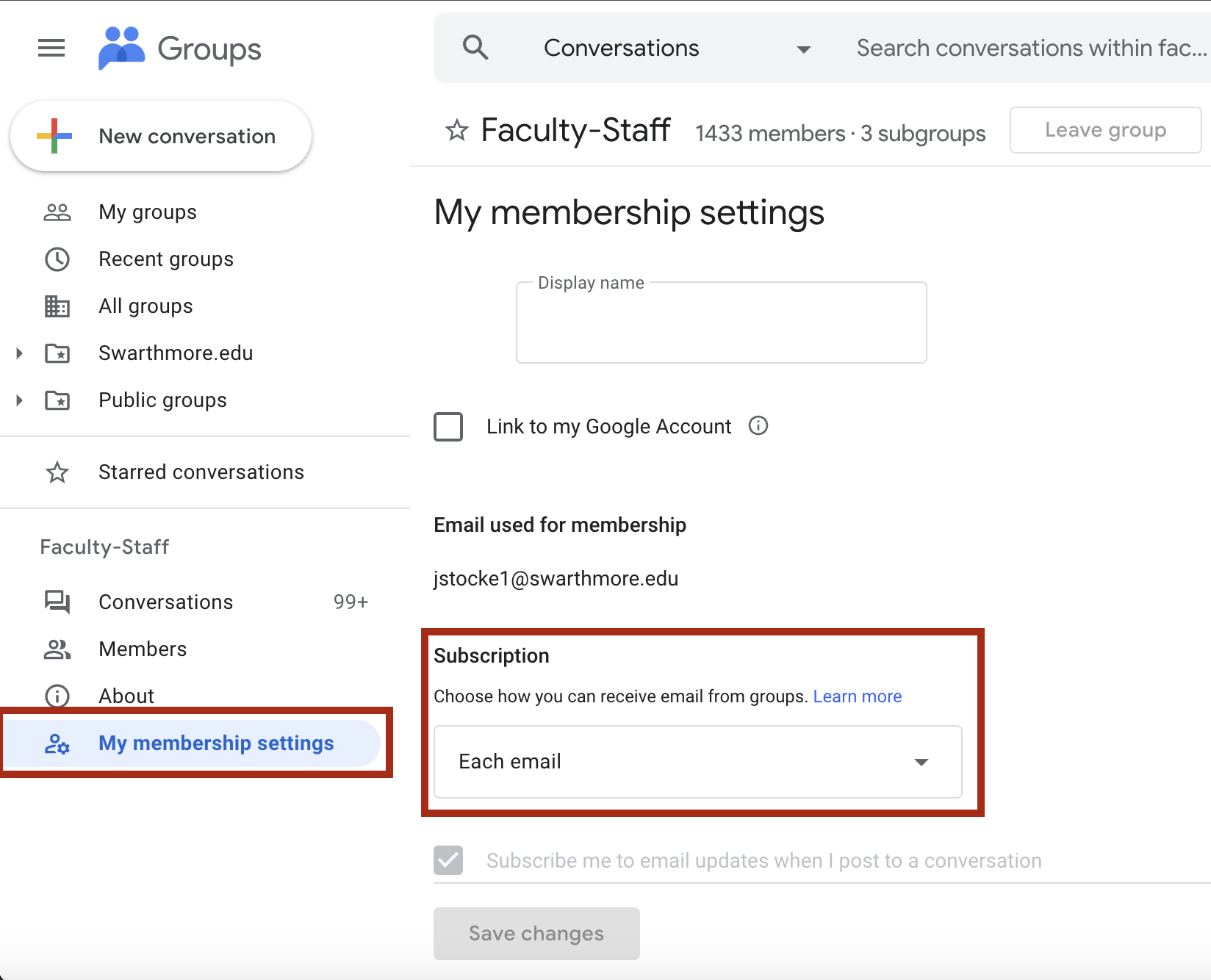
- Click on the group from your My Groups list that you wish to change your email settings for
- Ex. Faculty-Staff
- On the left-hand side at the bottom choose “My membership settings”
How do I leave a Google Group?
- Once on the “My membership settings” page for the Google Group. Click on the “Leave Group” button

- Confirm you wish to leave the group by clicking “Yes, leave group”


How do I change my email settings?
- Click on the group from your My Groups list that you wish to change your email settings for
- Ex. Faculty-Staff
- On the left-hand side at the bottom choose “My membership settings”
- Under the Subscription section, use the dropdown menu to choose how you would like to receive emails from the group
- We suggest “Each email” or “Digest”
- Selecting “No mail” will keep you as a member of the group, however, you will no longer receive mail.

This is a summary of what each Subscription level entails.
- Each email—Messages are sent individually as they're posted to the group.
- Digest—Up to 25 complete messages are combined into single emails and sent daily.
- Abridged—Summaries of up to 150 messages are combined into single emails and sent daily.
- No email—Messages from the group are not sent.
Are there Google Groups that I can not leave?
Yes, there are a number of “Official” Google Groups where membership is deemed essential for communication from College officials. Included in this list is any group that starts with the word “official”, as well as the class year groups and residence hall groups. Group membership in these groups is automatically assigned based on the individual’s role with the College. When viewing the “Membership Settings” page for one of these groups, the “Leave Group” button will be greyed out.
