Jump to content

View Panopto Quiz Results

From Swarthmore Knowledge Base
Revision as of 20:33, 7 May 2026 by Aruethe2 (talk | contribs) (Created page with "It is possible to insert quizzes within a Panopto video. This page explains how to see the results of the quiz. # Login to Panopto at [http://swarthmore.hosted.panopto.com panopto.swarthmore.edu]. # '''Hover''' over the video with the embedded quiz (should display menu options). # Click on '''Settings.'''alt=Example Panopto video with the settings button highlighted|center|thumb|600x600px # Click on the '''Quiz Result...")
(diff) ← Older revision | Latest revision (diff) | Newer revision → (diff)

It is possible to insert quizzes within a Panopto video. This page explains how to see the results of the quiz.

  1. Login to Panopto at panopto.swarthmore.edu.
  2. Hover over the video with the embedded quiz (should display menu options).
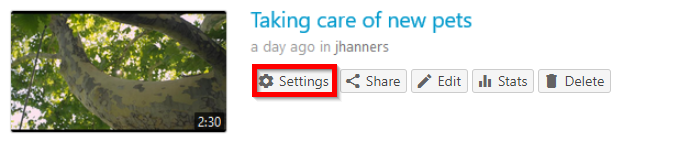
  3. Click on Settings.
    Example Panopto video with the settings button highlighted
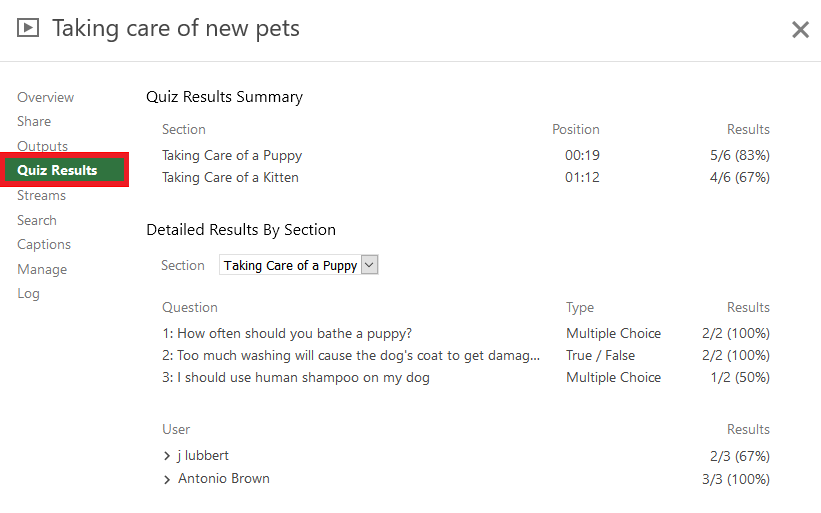
  4. Click on the Quiz Results tab.
    A sample Panopto video Quiz Results section
  5. Review results summary or download a copy. The downloaded file is in CSV format.

    Sample Panopto video showing Quiz Results section with the Download link highlighted

Read more about Panopto Quiz Results from Panopto's support documentation.