
View Panopto Quiz Results: Difference between revisions
Created page with "It is possible to insert quizzes within a Panopto video. This page explains how to see the results of the quiz. # Login to Panopto at [http://swarthmore.hosted.panopto.com panopto.swarthmore.edu]. # '''Hover''' over the video with the embedded quiz (should display menu options). # Click on '''Settings.'''alt=Example Panopto video with the settings button highlighted|center|thumb|600x600px # Click on the '''Quiz Result..." |
Automated edit: Updated image alt text for accessibility |
||
| Line 3: | Line 3: | ||
# Login to Panopto at [http://swarthmore.hosted.panopto.com panopto.swarthmore.edu]. | # Login to Panopto at [http://swarthmore.hosted.panopto.com panopto.swarthmore.edu]. | ||
# '''Hover''' over the video with the embedded quiz (should display menu options). | # '''Hover''' over the video with the embedded quiz (should display menu options). | ||
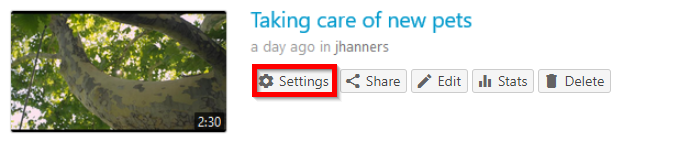
# Click on '''Settings.'''[[File:View Panopto Quiz Results 1778185904090.png|alt= | # Click on '''Settings.'''[[File:View Panopto Quiz Results 1778185904090.png|alt=Panopto video titled 'Taking care of new pets' with the Settings button highlighted|center|thumb|600x600px]] | ||
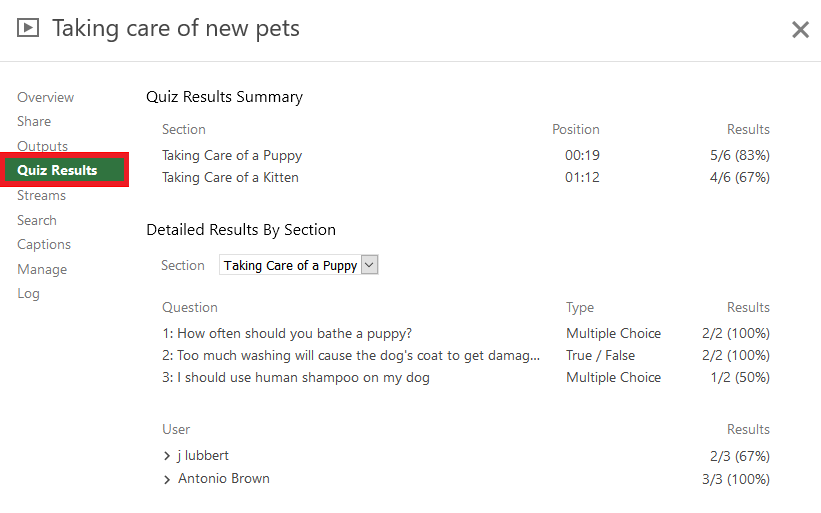
# Click on the '''Quiz Results''' tab.[[File:View Panopto Quiz Results 1778185948544.png|alt=A sample Panopto video Quiz Results section|center|thumb|600x600px]] | # Click on the '''Quiz Results''' tab.[[File:View Panopto Quiz Results 1778185948544.png|alt=A sample Panopto video Quiz Results section|center|thumb|600x600px]] | ||
# '''Review''' results summary or '''download''' a copy. The downloaded file is in CSV format.[[File:View Panopto Quiz Results 1778185977344.png|alt=Sample Panopto video showing Quiz Results section with the Download link highlighted|center|thumb|600x600px]] | # '''Review''' results summary or '''download''' a copy. The downloaded file is in CSV format.[[File:View Panopto Quiz Results 1778185977344.png|alt=Sample Panopto video showing Quiz Results section with the Download link highlighted|center|thumb|600x600px]] | ||
Revision as of 01:29, 7 July 2026
It is possible to insert quizzes within a Panopto video. This page explains how to see the results of the quiz.
- Login to Panopto at panopto.swarthmore.edu.
- Hover over the video with the embedded quiz (should display menu options).
- Click on Settings.
- Click on the Quiz Results tab.
- Review results summary or download a copy. The downloaded file is in CSV format.



Read more about Panopto Quiz Results from Panopto's support documentation.